
Pre-Signed URL Expiry: How to Detect When Your Media URLs Will Break
Published on
Tags:
Pre-Signed URL Expiry: How to Detect When Your Media URLs Will Break
You cached a user’s profile picture URL. It worked yesterday. Today it’s a 403. Welcome to the world of pre-signed URL expiry — where every platform hides the expiry timestamp in a different query parameter, in a different format.
The Problem
When you connect a user’s social media account via OAuth, the platform gives you back profile details — display name, username, and an avatar URL. That URL looks like a normal image link, so you store it and move on.
Except it’s not a permanent URL. It’s a pre-signed URL — a temporary link with an embedded expiry timestamp, signed by the platform’s CDN. After the expiry date passes, the URL returns a 403 Forbidden or a blank image. Your app now shows broken avatars, and your users think something is wrong.
The fix seems simple: just check if the URL is expired and re-fetch it. But here’s the catch — every platform encodes the expiry differently:
Instagram buries it in a hex-encoded Unix timestamp under a parameter called
oeThreads uses the same
oehex encoding (both are Meta, same CDN)Facebook uses a decimal timestamp under
extTikTok puts it in
x-expiresLinkedIn tucks it into a single-character parameter
e
There’s no standard. No shared parameter name. No shared encoding. You need platform-specific parsing for each one.
Let’s walk through exactly how to detect expiry for each platform, with the actual URL parameter names and parsing logic.
The Platforms at a Glance
Platform | URL Parameter | Format | Example |
|---|---|---|---|
| Hex Unix timestamp |
| |
Threads |
| Hex Unix timestamp |
|
| Decimal Unix timestamp |
| |
TikTok |
| Decimal Unix timestamp |
|
| Decimal Unix timestamp |
|
Three out of five use plain decimal timestamps. Instagram and Threads are the outliers — hex-encoded, because of course they are. (Both are Meta platforms sharing the same CDN infrastructure.)
Step-by-Step: Extracting the Expiry Date
The approach is the same for all five platforms:
Parse the URL’s query string
Find the platform-specific parameter
Parse the value into a Unix timestamp (handling hex for Instagram)
Convert to a UTC datetime
The Generic Extraction Logic
Here’s the core idea. Given a URL like:
https://scontent.cdninstagram.com/v/t51.2885-19/photo.jpg?_nc_ht=...&oe=69AA3F6F&...
You need to:
Extract the query string
Split on
&to get key-value pairsFind the one matching your platform’s parameter name
Parse the value as a Unix timestamp (epoch seconds)
Convert to a datetime
In pseudocode:
function extractUrlExpiryDate(url, paramName, parseFunction):
    query = parseQueryString(url)
    expiryValue = query[paramName]
    timestamp = parseFunction(expiryValue)   // decimal or hex
    return datetimeFromEpochSeconds(timestamp)  // UTC
The only thing that changes per platform is the parameter name and (for Instagram and Threads) the parse function.
Instagram & Threads — The oe Parameter (Hex)
Instagram and Threads both use Meta’s CDN, so their avatar URLs follow the same pattern. They look something like this:
https://scontent-fra3-2.cdninstagram.com/v/t51.82787-19/640398073_n.jpg
  ?stp=dst-jpg_s206x206_tt6
  &_nc_cat=104
  &ccb=7-5
  &_nc_sid=bf7eb4
  &_nc_ohc=f1WOvJbPXuIQ7kNvwEcrM85
  &oh=00_Af...
  &oe=69AA3F6F
Threads URLs share the same CDN but use a slightly different path prefix:
https://scontent.cdninstagram.com/v/t51.89012-19/573323465_n.jpg
  ?stp=dst-jpg_s206x206_tt6
  &_nc_cat=1
  &ccb=7-5
  &_nc_sid=30ff31
  &oh=00_Af...
  &oe=69D538E2
The expiry is in the oe parameter — and it’s hex-encoded:
oe=69AA3F6F
To get the actual timestamp, parse it as a base-16 integer:
69AA3F6F (hex) → 1772765039 (decimal) → 2026-03-06T02:43:59 UTC
In Java:
Long.parseLong("69AA3F6F", 16) // → 1772765039
In Python:
int("69AA3F6F", 16) # → 1772765039
In JavaScript:
parseInt("69AA3F6F", 16) // → 1772765039
This is the one that trips people up. If you try to parse 69AA3F6F as a decimal integer, you’ll either get an error or a nonsensical date billions of years in the future. It’s hex. Always parse it as hex. This applies to both Instagram and Threads — same Meta CDN, same encoding.
Facebook — The ext Parameter
Facebook profile picture URLs follow a similar pre-signed pattern, but the expiry parameter is ext and it’s a plain decimal Unix timestamp:
https://platform-lookaside.fbsbx.com/platform/profilepic/
  ?asid=885835851063663
  &height=50
  &width=50
  &ext=1777715762
  &hash=AT8Yk8SMQUeEsTTZYoMUp4nl
Extraction:
ext=1777715762 → 2026-05-02T09:56:02 UTC
No hex conversion needed — just parse it as a regular integer.
TikTok — The x-expires Parameter
TikTok avatar URLs include x-expires as a decimal Unix timestamp:
https://p16-common-sign.tiktokcdn.com/musically-maliva-obj/1594805258216454~tplv-tiktokx-cropcenter:168:168.jpeg
  ?dr=14577
  &refresh_token=c0aadb35
  &x-expires=1776463200
  &x-signature=y0CRJyp%2FkJT7WNTB54hM4%2F31g2w%3D
  &t=4d5b0474
Extraction:
x-expires=1776463200 → 2026-04-17T22:00:00 UTC
Same as Facebook — decimal, straightforward.
LinkedIn — The e Parameter
LinkedIn keeps it minimal. The expiry parameter is just e:
https://media.licdn.com/dms/image/v2/D4E03AQFW7wHV06qzsw/profile-displayphoto-shrink_100_100/
  profile-displayphoto-shrink_100_100/0/1729613404484
  ?e=1777507200
  &v=beta
  &t=ZJGALXs7lw2LETgRzDRWrE7aoCoHEXoXvm_9sByALIg
Extraction:
e=1777507200 → 2026-04-30T00:00:00 UTC
Decimal timestamp, single-character parameter name.
What About the Other Platforms?
Not every platform uses pre-signed avatar URLs. Some give you permanent (or at least long-lived) URLs that don’t have expiry parameters at all:
Platform | Avatar URL Example | Pre-signed? |
|---|---|---|
X/Twitter |
| No |
YouTube |
| No |
Bluesky |
| No |
Telegram |
| No |
These URLs don’t embed an expiry timestamp in the query string, so there’s nothing to parse. They can still break if the user changes their profile picture, but they won’t expire on a timer.
What to Do with the Expiry Date
Once you’ve extracted the expiry datetime, the logic is simple:
Store the expiry alongside the URL — when you save the avatar URL, save the parsed expiry datetime with it
Check before serving — before returning a cached avatar URL to your frontend, compare the expiry against the current UTC time
Re-fetch when expired — if the URL is expired (or about to expire), call the platform’s user profile API again to get a fresh URL with a new expiry
if (avatarUrlExpiryDate != null && now() >= avatarUrlExpiryDate):
    freshProfile = fetchProfileFromPlatform(account)
    updateStoredAvatarUrl(freshProfile.avatarUrl, freshProfile.avatarUrlExpiry)
Don’t wait for 403s. By the time your frontend gets a 403, the user is staring at a broken image. Proactively check expiry before serving the URL, and you’ll avoid the broken-avatar experience entirely.
Common Pitfalls
Instagram’s and Threads’ oe is hex, not decimal — this is the most common mistake. If your parsed expiry date is somewhere in the year 4000, you’re parsing hex as decimal
Parameter names are case-sensitive — oe is not OE. x-expires is not X-Expires. Match the exact case from the URL
Not all URLs have expiry parameters — some platform URLs may omit the expiry parameter entirely. Handle the missing-parameter case gracefully — treat it as "unknown expiry" and re-fetch on a schedule
Timezones matter — these are Unix timestamps (seconds since epoch, UTC). Don’t accidentally interpret them in local time
URLs can break before expiry — pre-signed URLs can also be invalidated server-side if the user changes their profile picture
Don’t try to modify the URL — you can’t extend a pre-signed URL’s lifetime by changing the expiry parameter. The URL is cryptographically signed. Change any parameter and the signature breaks
TL;DR — The Full Flow (Diagram)
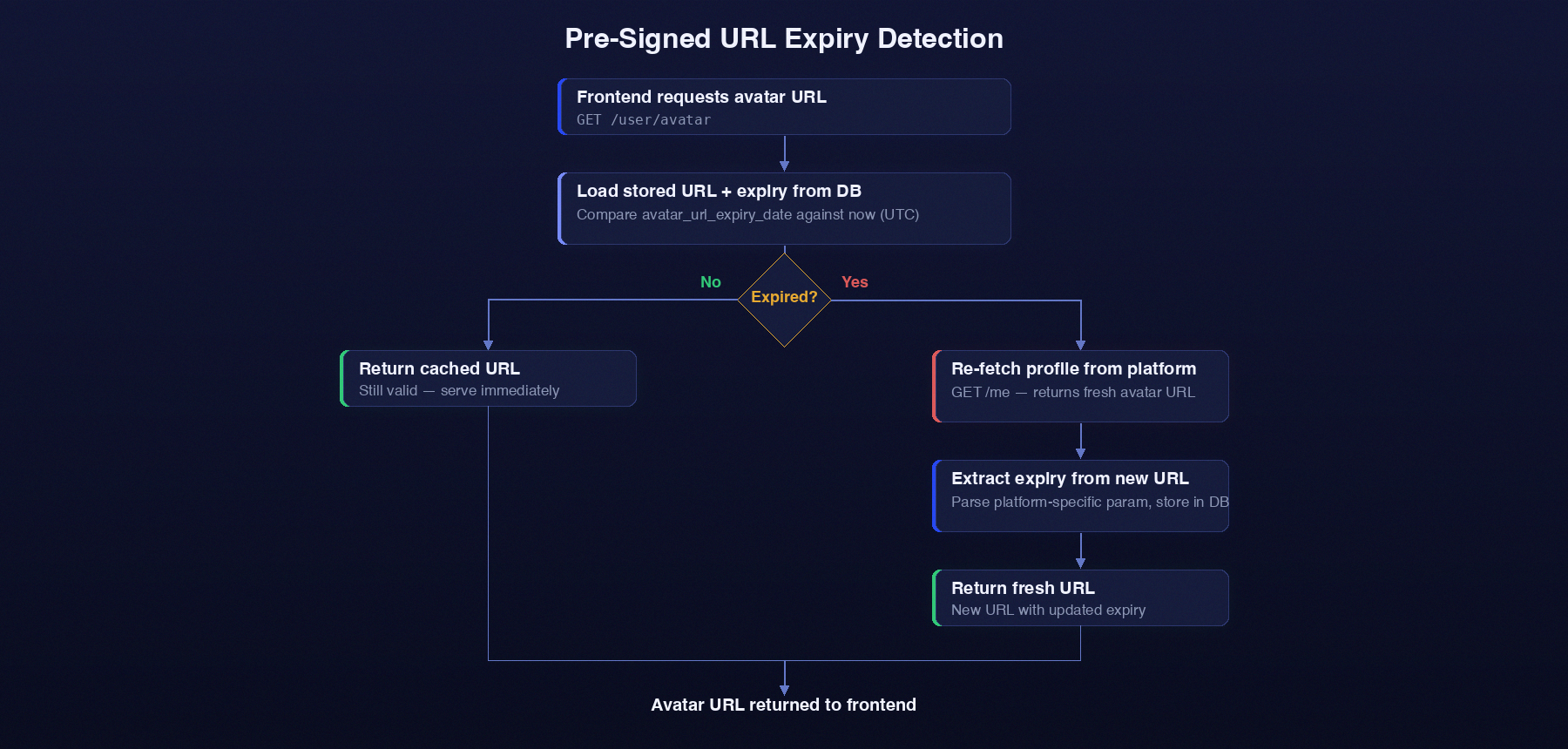 Pre-Signed URL Flow
Per-Platform Parsing
Platform | Parameter | Parse Logic |
|---|---|---|
|
| |
Threads |
|
|
|
| |
TikTok |
|
|
|
|
About PostPulse
PostPulse handles pre-signed URL expiry detection across all connected platforms automatically — extracting, storing, and refreshing avatar URLs before they break. Along with token refresh, media publishing, and cross-platform scheduling, it’s the infrastructure layer so you don’t have to reverse-engineer CDN query parameters yourself.
About the Author

Founder of PostPulse — a social media scheduling platform for creators and teams. Software engineer with a passion for building developer tools and simplifying complex API integrations across social media platforms.